Review and calibrate judgments
Purpose
Have people grade a fixed set of evidence, then measure agreement with a specific automated grader. Human reviews remain separate from automated measurements.
Prerequisites
evaluation.manage creates/archives queues, calibrates a version and promotes corrections. evaluation.review grades or skips items. evaluation.read opens queue metadata; evaluation.content.read opens comments, corrections and experiment bodies. Trace subjects also need observability.read and observability.content.read on the Team. A Reviewer custom role starts with team.viewer, evaluation.review and evaluation.content.read; add observation-content authority when reviewing production Traces.
Procedure
- Open Evaluate → Review and choose New review queue. Give it a Name, pick the Score definition it answers, and choose its Subjects: Experiment takes the items of one completed experiment, Auto-evaluation takes the Traces one auto-evaluation sampled between From and To, which are stated in UTC. Choose Create review queue. A queue answers exactly one definition and is filled once, at creation, with at most 200 subjects; the list shows each queue's definition, its subjects, its Pending / Done / Skipped progress, its status and when it was opened.
- Choose Open on a queue. The item list names every subject with its status, the name of the reviewer who finished it and the value they recorded, and the queue opens on the first item still to grade. The panel shows the subject — the Input, Expected output and Output of an experiment item, or the captured request and response of a Trace — then Judge ·
<value>with the judge's reasoning where one has already graded it. Record a Value by the definition's own type, say why in Comment, and choose Save review. Skip item moves on without a score, Next opens the next item still to grade, and choosing a subject in the list opens that one. - Write what the answer should have been in Correction on an experiment-item subject. A correction is stored beside the item, not applied: someone holding
evaluation.manageopens the finished item and chooses Use as expected output, which writes it to the dataset item the experiment item came from and opens the next dataset version, exactly as editing that item does. A Trace subject takes no correction, because it has no dataset item behind it. - Open the evaluator and read the Agreement column on its Versions table, which says Not calibrated. until somebody measures that version. Under Calibrate pick a Review queue on the same score definition and a Version, then choose Calibrate. The page states Agreement 50% · 2 compared with the queue it compared, Cohen's kappa beside it — and, for a definition that is a number in a range, the mean absolute error — and lists every Disagreement: the subject, the judge's value and the reviewer's. Calibrating again after more grading replaces the stored share; every calibration and the sample it named stay in the audit.
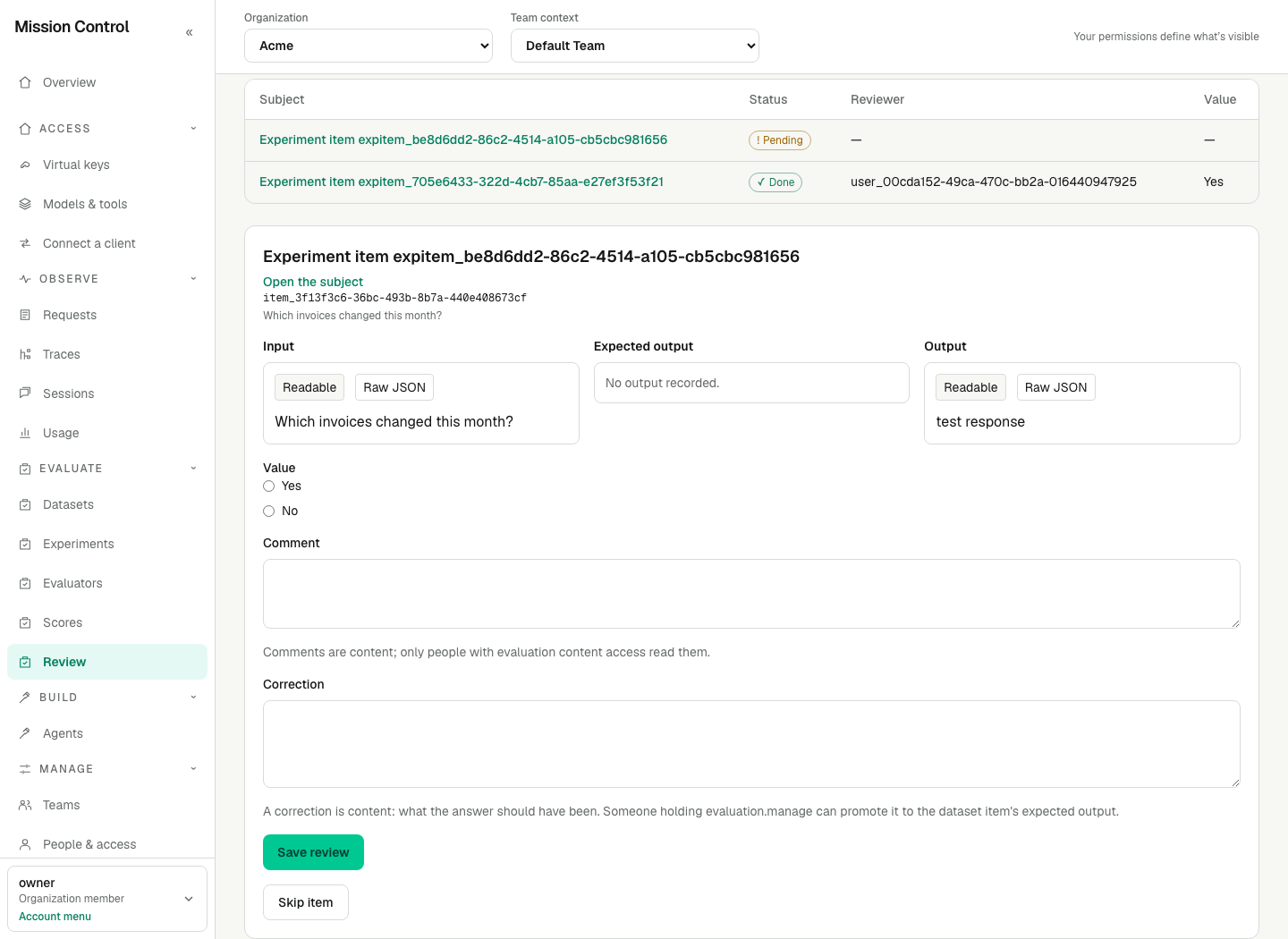
A queue holds one score definition and one fixed list of subjects; the value is metadata, and the comment and the correction are content.
Expected result
A review queue is grading work, not a filter: each subject appears once, each item is graded once, and a skipped item stays skipped. Its grades are ordinary scores with source Review, the reviewer as their author and the queue item as their origin, so they reach Evaluate → Scores, the Trace and the experiment item exactly as a score recorded anywhere else does, and they never replace or merge with the judge's. One live review score stands per item and reviewer: grading a subject again means choosing Retract on your own score first, because a score is a record and is corrected by replacing it rather than by editing it. An item that is already finished closes the queue's own Save review form for everybody, and the way to grade it after a Retract is Grade this item again with Save score on the same panel: that grade answers the same item, and the item stays finished with its correction as it was. Archiving a queue hides it from the tab while its items, its scores and every agreement calibrated from it stay.
Agreement is the share of the compared subjects where the judge matched a person — within a tenth of the definition's range for a number, exactly for a category or a yes-or-no. It is measured only over the queue's finished items that carry both a live judge score of the chosen version and a live review score, it is written only when somebody chooses Calibrate, and it never changes as a side effect of grading. Calibrate reads the judgments that already exist: it starts no judgment, spends no Team funding and waits for nothing. No number means nobody has calibrated that version, never that the judge agrees with nobody. Cohen's kappa, the mean absolute error and the disagreeing subjects are shown beside the share and are not stored.
Verification
Verify the queue contains the intended subjects and definition. Grade an item, inspect its independent Review score and calibrate the exact version/pass that scored it. Read the comparable-pair count beside agreement. Calibration makes no model call and requires no restart or new session.
Failure recovery
No review queues yet. on the Review tab means this Team has opened none, or every one it opened has been archived. Nothing left to review. means every subject of the queue is finished or skipped. A missing Save review form means you lack evaluation.review on that Team, your own live score already stands on that item — the panel shows it with Retract above where the form would be — or the item is already finished or skipped, which closes that form for everybody. This Trace's captured content is not visible to you. means the subject is a production Trace and you lack observability.content.read on that Team, or Observe access to it at all; ask for that grant rather than grading what you cannot read. A missing Correction field means the subject is a Trace, which has no dataset item to edit, or you lack evaluation.content.read; a missing Use as expected output means you lack evaluation.manage, the item is not finished, or it carries no correction — a manager who may not read the correction still promotes it, because the control stands wherever the item carries one and the service reads the text itself. No subject in this queue carries both a human score and a judge score of this version. under Calibrate means the sample is empty: grade some of the queue's items, or choose the version that actually scored those subjects. A queue offered nowhere under Calibrate answers a different score definition from the judge's.