Compare evaluation evidence
Create a repeatable comparison
Use Evaluate → Experiments → Compare models and reusable templates to create a group of 2–5 immutable arms. A group launches all its arms together after every arm passes admission. No agent draft or active deployment is modified. Agent Test, Agent Evaluate and publication defaults continue to use the actual saved draft; newer comparison variants remain explicit history choices.
Access and setup
You need current Team evaluation.read, evaluation.execute, evaluation.content.read, agent.read and agent.test. Creating a new model variant also needs agent.edit; test-only callers can choose existing permitted snapshots. Saving reusable templates needs evaluation.manage. Normal role presets are unchanged. No new key, session or restart is needed; changed administrator model configuration must be activated through the usual configuration workflow.
Four-step procedure
- Subject and data: name the comparison, open Base snapshot and type an Agent name, a snapshot number or a pasted snapshot ID. Each result shows the Agent name with its snapshot number, model and creation date, and Load more brings further results. A selection stays selected after the search has moved on. Select the dataset, an explicit historical Dataset version from the versions that exist, and optionally an immutable Dataset slice filter version. Full-dataset runs honor that explicit version too.
- Arms: choose Existing snapshot or New model variant of base snapshot for each arm. A variant copies the complete immutable base definition and changes only the model resource. Existing snapshots may differ in instructions, tools, Connector modes or context binding as well as model. Use 2–5 arms.
- Grading: select 1–5 repetitions, a tool policy, optional Enrichment validator, and the exact versions of the Pinned graders. Each judge selects generation or enrichment evidence; enrichment dependencies remain pinned in the group. Choose a Primary metric with its exact grader/version. A shared definition never silently selects the latest grader. Categorical metrics show distributions without an invented numerical winner. Version lists offer only the versions that exist, newest first; a restored template's version that no longer exists stays selected and reads (unavailable) instead of silently becoming another version.
- Readiness and spend: choose Check comparison readiness. Inspect actual model IDs, provider/model/profile routes, declared profile capability hashes, prompt hashes, tools, Connector modes, context binding and revision/settings identities. Different values explain what changed beyond the model. Unknown source/runtime/provider revisions remain unknown. Correct blocked checks before Start comparison. Back preserves fields; failed or lost responses preserve the same operation key for an unchanged retry.
Readiness is read-only: it provisions no identity or snapshot and makes no paid call. Initial generation executions and all judgments are displayed separately. Assertions add no model/tool invocation. The admission limit of 1,000 planned invocations includes generation executions plus each model/tool grader's current five-attempt worker recovery allowance, including enrichment. A validator with a configured zero fee still counts as tool work. Provider retries, agent model/tool rounds and unknown token/fee pricing prevent this count from being a guaranteed financial ceiling or funding reservation. Choose explicit smaller slices or fewer arms/repetitions if the bound refuses the group; it is never raised automatically.
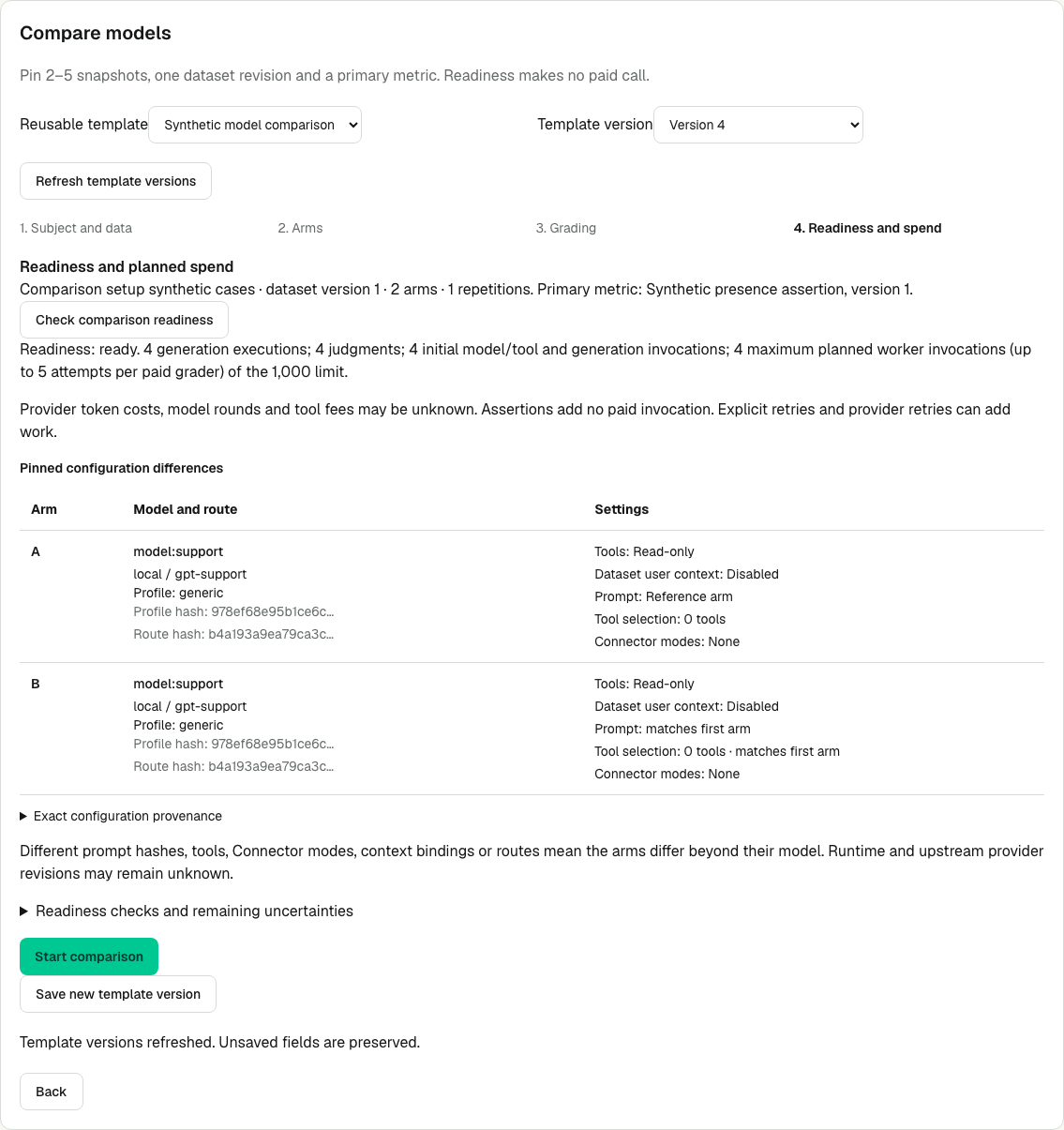
The synthetic readiness view shows the pinned configuration of each arm beside the workload policy. Both arms use the same deterministic model:support fixture, so the image demonstrates setup and execution controls. The image contains synthetic evidence and demonstrates no production quality result.
Templates and expected result
Choose Save as template, or Save new template version after selecting an existing template. Templates retain explicit dataset/slice/snapshot/grader versions, the complete dependency plan, repetitions and primary identity in protected content. Reusable template and Template version restore a saved configuration; launch resolves current authority and availability for those explicit references. It never silently upgrades a version. Editing a restored configuration creates a new intent; save another version to make that edit reusable.
Successful saves update and select the template and its new version immediately. Selecting an older Template version changes the draft you edit; it does not roll back the current revision used to save the next version. Refresh template versions reads the current header and available versions while preserving unsaved fields. After a confirmed template_revision_conflict, refresh and save again. After an uncertain response, retry the unchanged save: the original request key, submitted fields and expected revision stay together even if you refresh metadata, so a committed version is recovered without a duplicate.
Open comparison group shows each immutable experiment, the readable primary metric/grader, actual model configuration, live generation/grading status and human-readable recorded cost with its coverage. Updates pause in hidden tabs, retry transient errors and stop after terminal work. Inspect A/B opens the corresponding run. Compare B with A pins both original grading passes plus the exact primary definition/grader/version; later regrades do not replace that evidence. Inspect the run manifest for exact datasetItemRevisionId/repetition membership and its hash. Slice filter counts describe the original filter scope; actual manifest pairs determine this group's work.
Verification and recovery
- Check that each arm names the intended snapshot, dataset version, settings and complete grading plan. Model variants must leave the agent draft and deployment unchanged.
- Identical request key/body retries return the original group under current read/execute/content and variant permissions, including after response loss or service restart. A changed body with that key returns
request_key_conflict; edit the intent and use its new key. Rechecking unchanged readiness preserves the key. Template launch receipts can recover an already-created group after template content becomes unavailable; a fresh launch still requires the selected template body. comparison_invocation_limitrequires reducing explicitly planned work.comparison_primary_invalidrequires a definition and exact grader/version actually selected in the plan.stale_preflightrequires checking readiness again.template_revision_conflictrequires Refresh template versions before saving against the current header.starter_unauthorizedorgrading_creator_unauthorizedrequires restoring the recorded starter’s current group rights before new work, or having an authorized caller create a deliberate new run/regrade. Already-recorded results stay inspectable under the reader’s own rights. Missing selected content refuses a fresh launch; unavailable unrelated historical template versions do not invalidate intact selected versions.- Current group execution rights, including
evaluation.content.read, are rechecked from stored arm membership before a generation claim, protected item input read, Preview/admission and each new item/turn. Losing content access stops new dispatch. A call already dispatched still settles; its output, conversation, attempt, evidence and cost are retained. If a later conversational turn is refused, the incomplete item fails while its preceding turn remains retained.agent.editis creation-only and is not required to execute an already materialized snapshot. The same current rights gate new original-pass group grading before claim, protected subject reads and model/tool dispatch. This supplement applies only to experiment-origin initial passes; explicit regrades, samples and legacy standalone grading retain their own existing authorization. Already-dispatched judgments and their costs settle under the existing evidence-retention rules. Legacy standalone generation keeps its existing permission contract. - Within a group, the scheduler runs one complete item quantum, including every conversational turn, then persistently rotates arms. Unrelated queued runs get an opportunity between group items. Preview deployments stay alive between quanta; completed turns and items are not replayed. Concurrency is unchanged.
- A graceful worker stop drains the active group's whole item, renewing its lease while it drains. An expired claim after a hard crash marks an in-flight group item
invocation_indeterminate, preserving its conversation, attempt identity and actual/unknown cost evidence. It is not automatically replayed, and a cancelled arm cannot block its peers indefinitely. Inspect it and use an explicit linked retry when permitted. The existing all-toolsretry_side_effect_uncertainrefusal still applies. This is not a paid exactly-once guarantee. Older standalone experiments retain their documented interruption/requeue behavior.
See Run history and recovery, Versioned datasets and slices, and Private API.
Purpose
Compare two completed experiments, or two grading passes of one experiment, while keeping generation reliability, selected grading coverage, paired quality and spend separate. Read Configuration and comparability and Comparison summary before investigating individual cases.
Prerequisites
- Both experiments belong to the same Team and dataset and are completed and unarchived. Different dataset versions can be explored; only identical immutable revisions pair.
- Your current role needs
evaluation.read. Answer bodies requireevaluation.content.read; opening protected tool evidence also requires the applicable source content permissions. Metadata readers see identities and fingerprints, never private prompt, context or source bodies. - This is a read-only workflow. No new key, session, restart or configuration activation is needed. Creating new grades or an interpretation uses the permissions described in Regrade saved answers and Measurements and coverage.
Procedure
- Open Evaluate → Experiments, open the candidate and choose Compare.
- Choose a Baseline. The same experiment is available for comparing independent passes. Choose Candidate grading pass and Baseline grading pass, then Apply comparison to load each pass's choices.
- Choose the primary Definition and Source. Judge, Review and API scores remain separate. For automatic measurements choose Candidate grader/version and Baseline grader/version. Unique series on selected pass resolves only when exactly one matching grader/version exists on that pass; ambiguous selections require an explicit choice. A common definition never merges different judges or versions.
- Choose Candidate interpretation and Baseline interpretation, or keep Raw categories. Interpretation IDs are retained as provenance. Equivalent mappings on different passes are compatible even though their record IDs differ. A mapping applies only to its pinned evaluator/version; unrelated graders retain their own raw measurements.
- Choose Apply comparison. Read model routes, runtime/provider revision, tool schemas, grading plans, validator/schema fingerprints and interpretation differences. Unknown runtime, provider, context-binding or source availability is unknown on both sides; it does not prove equality. Captured reference counts do not prove that retained source content is currently complete or readable. Open authorized evidence inspection for that check.
- Read the six summary cards and the coverage tables. Expand Per-case means and ranges and Configuration facts and differences when needed.
- Use Outcome filter for Generation errors, Judge errors, Abstentions, Regressions or Changed labels. Only regressions is retained as a shortcut and takes precedence. Filters affect paired case rows, leaving summary denominators and the separately listed unmatched exclusions intact.
- Use the actions beside each case label; horizontally scroll the contained table for additional columns on smaller screens. Choose Compare case to read both original inputs, expected behavior, answers and the selected grader's reasoning side by side. Inspect case opens an unmatched case on its own. Titles, source IDs, tags and question previews come from protected original dataset metadata; readers without content access keep the opaque item ID. Recognized text renders as safe Markdown with automatic text direction and bidi isolation; Raw JSON retains structured fields, including empty answer text. Raw HTML and embedded images are not rendered. Durations use seconds/minutes and known cost deltas use currency.
- Use Open candidate item or Open baseline item for the selected pass and interpretation. Open exact grading execution, Open tool span and failure-span links identify the actual evidence, not the newest result. The panel rechecks content authority on open, refocus, visibility return and every ten seconds while visible. Routine checks wait for an in-flight read; an inspection that takes more than 20 seconds times out, clears protected content and retries on a subsequent check. Each arm applies its own refusal or redacted result immediately when that read settles, even while the other arm is still pending. A timeout clears only still-pending arms, preserving fresh results already received. Failed or denied reads clear previous protected content; closing clears the disclosure. Escape closes it and returns keyboard focus to its row. Export selected comparison retains both selections and coverage-aware summary/configuration metadata. Exported items include immutable revision IDs and generation-only cost facts; full-run totals include grading across all passes. Following Open exact grading execution → Open item, then the run breadcrumb and Compare, preserves the original comparison and reporting window. The execution determines its own local grading pass; a selected interpretation must match its actual Team/pass/grader/version. Candidate/baseline ordering remains separate from this local scope, including two passes of the same run. Returning through experiment navigation preserves the comparison.
- With
evaluation.manage, select Review candidate or Review baseline on the cases you want to inspect, enter that side's queue name, then choose Create candidate review queue or Create baseline review queue. Each side creates its own fixed list of 1–200 distinct terminal cases, including generation failures, blocked/cancelled cases, grader errors, abstentions and disagreements. Unmatched cases can also be selected. A missing, foreign, duplicate or nonterminal selection refuses the whole operation. Existing New review queue creation without a case selection still takes the first 200 completed answers. - Choose Open candidate review queue or Open baseline review queue, then grade with
evaluation.review. The selected pass and exact grader/version travel into review; humans and judges remain separate. Calibrate selected candidate grader or Calibrate selected baseline grader opens the created queue and exact pass/version/interpretation. A failed generation can receive a human review, but with no automated score it contributes no calibration pair and cannot fill automated coverage. See Review and calibrate graders.
Expected result
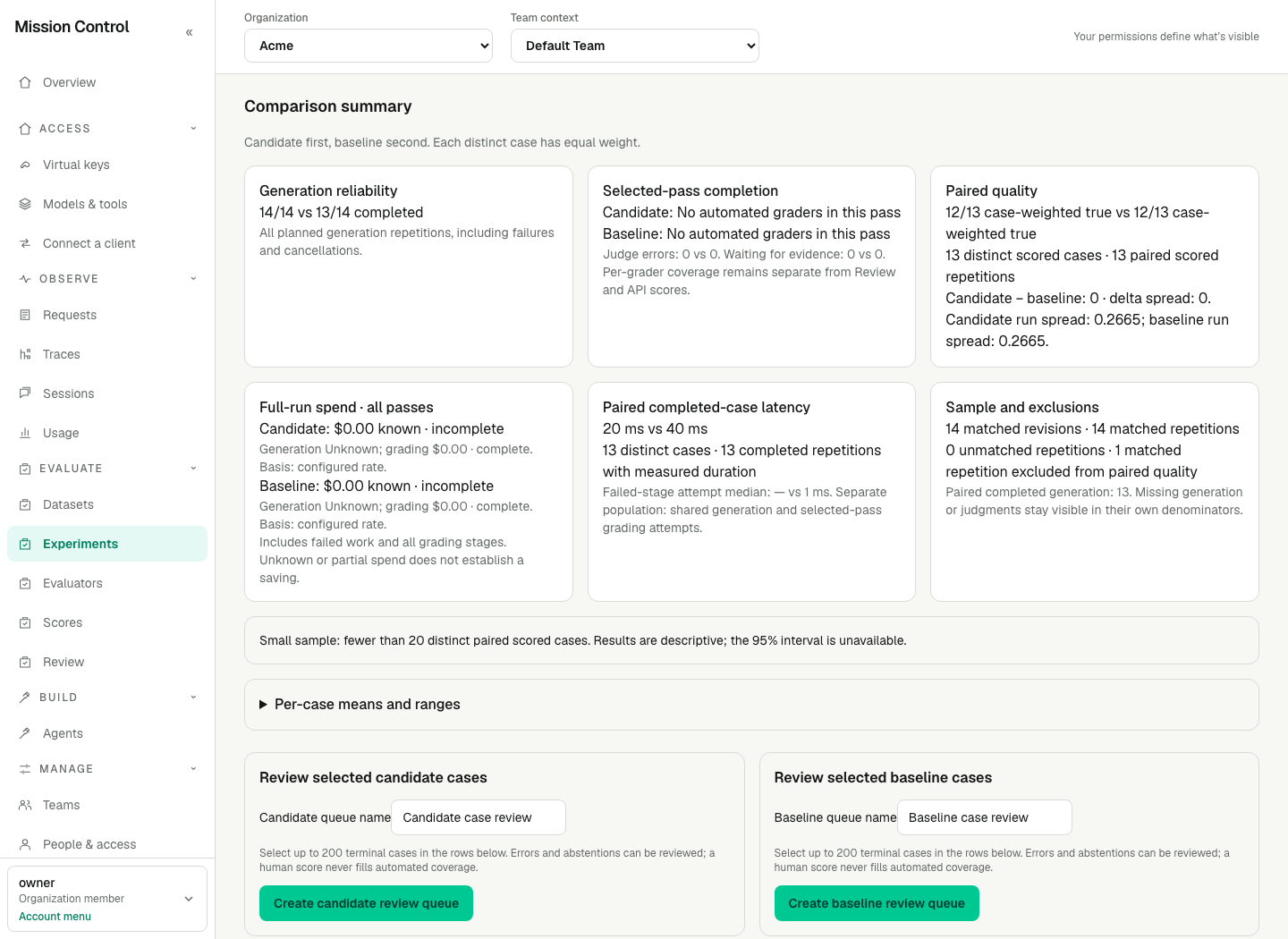
This deterministic synthetic fixture illustrates the original smoke's denominators. Generation is 14/14 versus 13/14. Both arms score 12/13 on paired legal correctness. These are independent facts. Citation coverage, when selected, has its own eligible/scored denominator; incomplete citation grades never establish citation correctness. The fixture's manual Review scores do not count as automated grading completion. Its generation attempts have unknown cost; with no automated grading spend, the full-run card shows a zero known subtotal marked incomplete, never a complete free run.
| Evidence | Denominator and meaning |
|---|---|
| Generation reliability | Completed generation repetitions / all planned repetitions. Failed, blocked and cancelled work remains visible. |
| Selected-pass completion | Completed judgments / expected judgments on selected completed answers. Waiting for evidence is a subset of outstanding grading, never another denominator. |
| Per-grader coverage | Scored / (eligible − not applicable), separately for each exact pass/evaluator/version. Abstentions, errors, pending and cancelled judgments remain unjudged applicable work. Manual/API scores cannot fill automated gaps. |
| Paired quality | Both arms generated a completed answer and have a live scored value for the selected series on the same datasetItemRevisionId and repetition. Excluded matched repetitions and distinct scored cases are stated explicitly. |
| Full-run spend | Generation and every grading pass/stage, including failed work and configured validator fees. knownMicros, coverage and basis remain together. Known configured zero is distinct from unknown cost. |
| Paired completed-case latency | Equal-weight case means from paired completed generation repetitions with measured latency, independently of grading quality. Failed-stage attempt duration is a separate population. |
New/missing cases, revised cases and unequal repetition counts appear under Unmatched cases and repetitions. Revised content never pairs merely because its mutable dataset item ID is unchanged. No missing repeat is invented or averaged in.
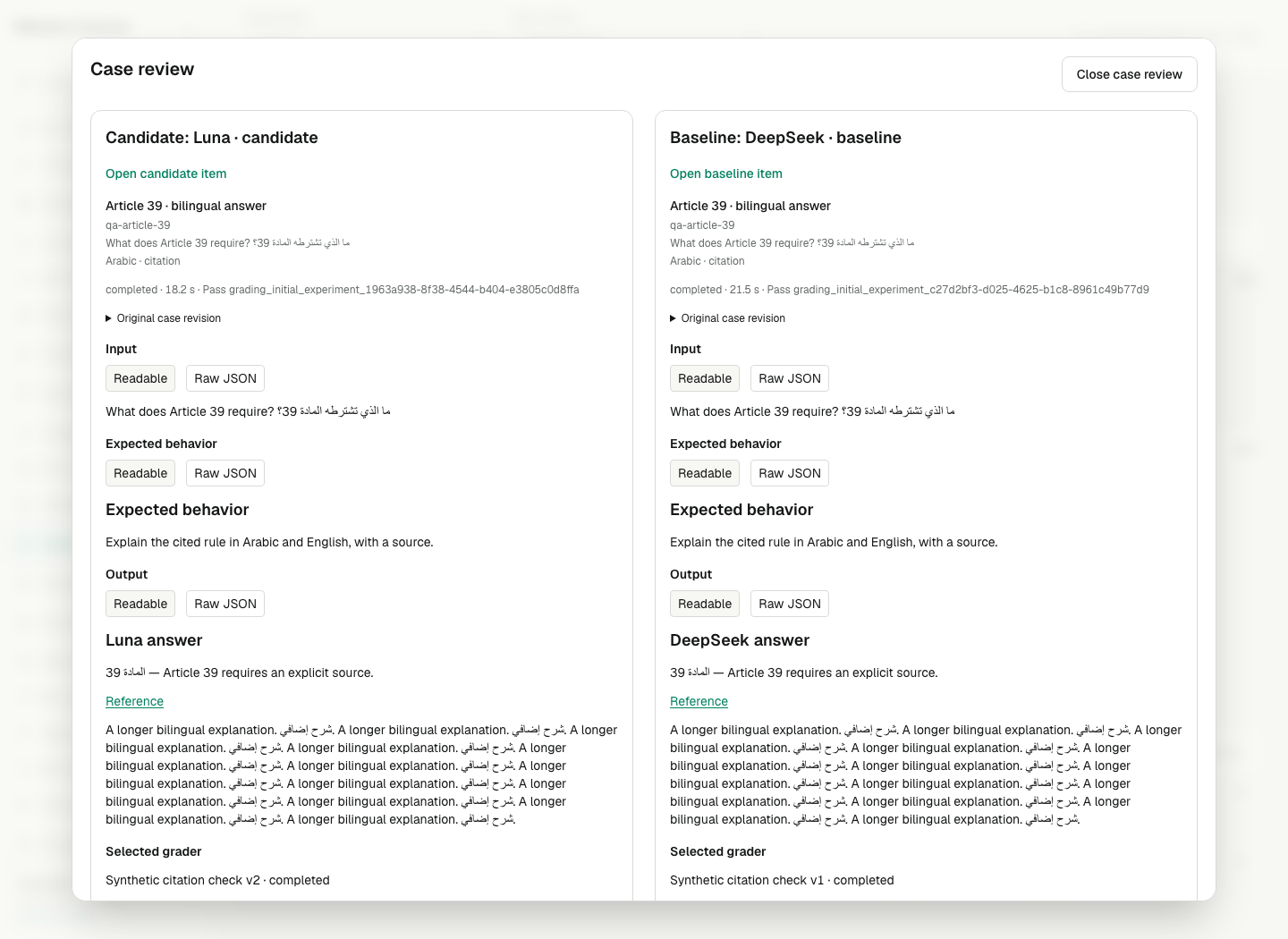
This fixture compares the original pinned revision even after the dataset has changed. The two sides retain their own grading pass and version. Scroll within long answers, inspect the full structured payload with Raw JSON, and open protected grader evidence only when your current permissions and the source's retention allow it.
For numeric and boolean metrics, matching repetitions collapse to per-case means before averaging cases. Per-case ranges show within-case variation. Run spread is the population standard deviation of each arm's case means; delta spread is the population standard deviation of the paired case differences. Boolean results with one result per case use counts such as 12/13; repeated cases use a case-weighted percentage beside explicit case/repetition counts.
At least 20 distinct paired scored cases are required for a 95% case-cluster bootstrap interval, using 2,000 deterministic resamples. Each resample draws whole cases with replacement and keeps their matched repeats together. The seed comes from stable selected run/pass/metric identity; unchanged evidence and selection gives the same interval despite row filters, heartbeats or late cost updates. Below 20 cases interval95 is null and Small sample explains that results are descriptive. No automatic winner or model recommendation is produced.
Raw deltas always mean candidate minus baseline. Improvement/regression labels honor compatible higher_is_better or lower_is_better directions. Unordered categories show label distributions and changes without numeric means or invented ranking. Abstentions and evaluator errors are never averaged as sentinel values. Historical categories change disposition only under an explicit pinned interpretation.
Different selected graders/versions, directions or interpretation semantics visibly withhold directional results while preserving observed values and provenance. Other metrics remain separate series; a mismatch on one selection does not suppress an unrelated exact grader. Aggregate arm means have their own observed populations; paired quality uses only jointly scored repetitions. An exploratory comparison does not satisfy a gate or relax its exact-version, full-scope, coverage or calibration requirements.
Per-row generation cost deltas are available only when both generations completed and both cost facts have complete coverage. Legacy zero, partial/unknown pricing and failed work cannot establish free execution or a saving. Paid tool validators retain known, unknown and explicitly configured-zero fee accounting. Summary failed-stage attempt medians use the lower median of the entire authorized matching population: shared generation attempts plus selected-pass grading attempts with measured durations and failed, blocked or interrupted outcomes. This population is not capped at 1,000; bounded failure lists remain capped.
Verification
Confirm the selected pass and grader/version IDs on both sides, then check generation and grading denominators before quality. Compare two passes of one run and reload; both controls and item/export links should retain their independent selections. Confirm unmatched revisions/repeats are listed and a small sample has no interval. Unknown cost must read Unknown, not zero.
Open a case and check that its source ID, question and expected behavior match the original revision. Escape should restore focus to Compare case or Inspect case. After creating a selected-case queue, confirm its fixed membership and the version shown by Calibrate. Creating or recording a human review must leave automated coverage unchanged.
Failure recovery
An unfinished or archived experiment cannot be compared. Choose a completed unarchived baseline in the same dataset. A selection belonging to another experiment/Team is refused without exposing its contents. If a pass has multiple graders on the primary definition, select one explicitly. An unavailable version remains an unavailable selection; the service does not silently switch it. Fix mismatched metric semantics by selecting compatible existing evidence or creating an authorized new pass/interpretation. Deleted evidence remains unavailable; comparing or exporting does not restore it.
An invalid or incompatible local interpretation on an execution link is refused; an invalid, foreign-Team or unrelated-run comparison carrier is discarded. A URL pass cannot override the execution’s recorded pass. If case details or protected reasoning become unavailable, refresh the comparison and check the exact pass/grader and current content permissions. Expired/deleted sources cannot be recovered by a cached score or a source hash. If a queue name already exists, choose a distinct name; no partial queue is created. Queue creation is a Console flow, not a new public management API.