Create, test and calibrate graders
Purpose
Save a complete grader and its first version, explicitly test saved answers, then read an exact grader's evidence, send selected cases to human review and compare the grader with those reviews. Automated judgments, human Review scores and API scores remain distinct.
Prerequisites
evaluation.readopens comparisons, queues and calibration results in the selected Team.evaluation.content.readreveals case bodies and output-only grader reasoning. Evidence-consuming graders also requireobservability.readandobservability.content.read, plus currently retained source evidence.evaluation.managecreates review queues and stores calibration.evaluation.reviewrecords or skips a human review. These are existing bounded permissions; no new role, key, session, restart or configuration activation is needed.- Creating a grader requires
evaluation.manage; the guided flow can create its score definition. Testing requires currentevaluation.read,evaluation.executeandevaluation.content.read. Evidence-consuming tests and all tool validators also need both observability read permissions. These checks use the person requesting the test, including any management-token restrictions, rather than the original run starter. - For review and calibration, have completed experiments and an active score definition. Choose the exact grader/version and grading pass before drawing quality conclusions.
Procedure
Create and test a grader
- Open Evaluate → Evaluators → New evaluator. Under Measure, enter a name and optional description, choose LLM judge, Assertion or Tool validator, and select an existing score definition or Create a score definition. New definitions support yes/no, a numeric range (default 0–1), or 1–50 unique category labels and values. Assertions require yes/no.
- Choose Next: criteria. Under Criteria and inputs, select a permitted model and write prompts for an LLM judge, or enter the protected assertion configuration, or for a tool validator pick the registered tool and map its arguments. Use the assertion example or the validator procedure. Input/output/expected-output variables use saved case content; tool/evidence inputs require protected retained capture. Set the measurement direction, optional pass threshold and coverage notice. An empty model menu explains whether routes or Team allowances are missing.
- Choose Next: review. Review the name, definition, kind, model and initial version; expand Review exact criteria and measurement policy. Back preserves your edits. Choose Create evaluator. The definition (if new), evaluator, first immutable version and retry receipt publish together after the protected content is durable. Invalid settings or persistence failure do not leave an empty evaluator, new definition or widened execution policy. Saving spends nothing; assertions need no model identity. LLM/tool identities are provisioned only at a validated save.
- Choose Test on samples. The form identifies the current saved version, independently of any historical version shown elsewhere. Choose an experiment and 1–5 completed answers, then Start test. A version changed in another tab is refused; reload before choosing a new test. This action can spend for model/tool graders, including recovery attempts. Assertions make no model call.
- Open test results and inspect each execution, answer, judgment, reasoning and cost. Results and costs remain stored for inspection, but tests create no experiment scores, add no automated coverage and cannot satisfy publish gates. Edit criteria with Save version to create the next immutable version; existing tests retain their original version.
- After completed samples, Review/calibrate opens the calibration section. A sample test does not calibrate a grader. Use Regrade answers for persistent experiment judgments, then create human reviews and calibrate the matching version/pass as described below.
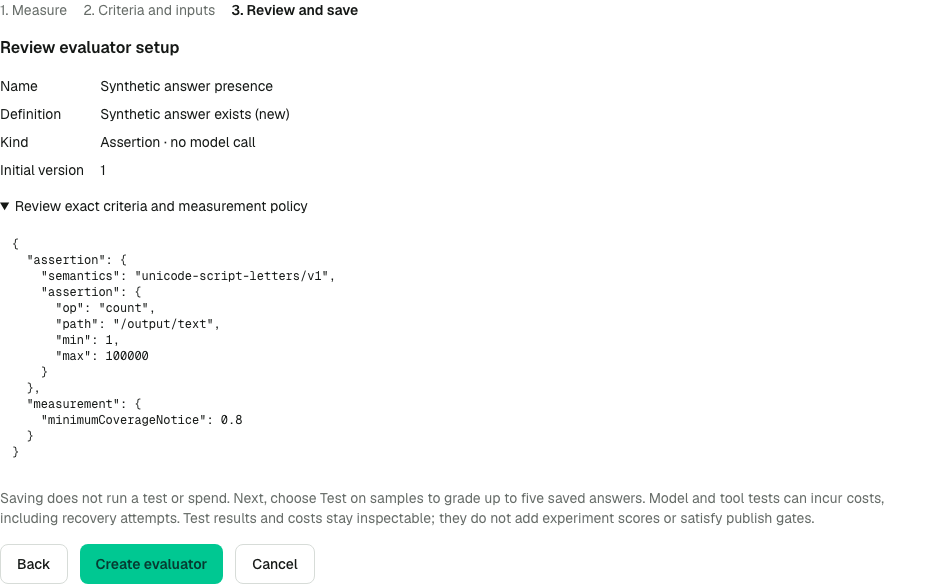
The synthetic review shows the complete configuration before the first save. No execution has started; sample testing is a separate explicit action after creation.
Review exact experiment judgments
- In Evaluate → Experiments → Compare, choose the primary definition, Judge, and both grading passes and grader versions. Apply the comparison.
- Filter Judge errors, Abstentions, Generation errors, Regressions or Changed labels. Open Compare case (or Inspect case for an unmatched row) and read the original input, expected behavior and answer. The panel never substitutes the current dataset revision or a newer grade.
- Read Selected grader and Grader reasoning. Expand a tool or source under Protected tool evidence. Open tool span opens its precise captured span; Open exact grading execution opens the selected judgment. From there, Open item uses the execution’s actual pass and validated local interpretation; the run breadcrumb and Compare retain the original comparison, side order and reporting window. A score is not permission to read source content.
- Select the cases with Review candidate or Review baseline, enter a queue name and create that side's queue. A queue holds 1–200 distinct terminal items from one experiment. An invalid selection fails atomically; it never expands into the entire experiment. The default New review queue flow still selects the first 200 completed answers.
- Open the newly created review queue. Read the Selected grader and grading pass before grading. Inspect selected grader revalidates protected evidence. Record Your review independently of Judge; use comments and an optional correction when permitted. Skip item preserves the selected read scope while moving on.
- From the review queue, choose Calibrate selected grader. The comparison creation result also offers Calibrate selected candidate grader or Calibrate selected baseline grader. The evaluator's Calibrate section selects that queue, version, pass and interpretation. Read agreement and the count of comparable pairs, then choose Calibrate to store the result if authorized. A manual review of a generation error or grader abstention has no automatic scored counterpart and adds no comparable pair.
Expected result
The queue stores exactly the selected case membership. Human reviews do not overwrite automated scores, convert abstentions to successes or increase automated coverage. Calibration compares only live human/judge measurements in the selected pass/version. Corrections remain proposed content until someone with evaluation.manage chooses Use as expected output, which creates a new dataset version without changing the evaluated revision.
Safe Markdown supports bilingual answers; Raw JSON preserves structured details. Escape restores the panel's opening button. Each comparison arm clears refused or redacted reasoning and tool/source bodies as soon as its own fresh read answers; a pending peer never delays that removal. Timeout affects only the still-pending arms. Keyboard focus stays on a surviving control and moves to Close only when its focused disclosure was removed.
Verification
After setup, open the evaluator and confirm Version 1, its kind/configuration and selected score definition. No sample or experiment score exists solely from saving. After testing, confirm the named current version and batch, inspect cost coverage, and check that experiment score totals and gate evidence did not change.
Check the queue's item count and item IDs, exact grading pass and grader version. Confirm Calibrate names the created queue and reports only cases carrying both a human score and a judge score. Review a failed generation and confirm automated coverage and comparable-pair counts do not increase.
Failure recovery
A lost setup response offers Retry saved request with the identical submitted configuration/key; recover that result before editing. A changed body with the same key is refused. Confirmed validation failures let you go back and fix the form. A duplicate name, archived/foreign definition, denied model/tool, invalid schema hash or malformed configuration refuses the complete save. A refused tool validator returns to Criteria and inputs with the reason beside the editor and every choice kept. An empty model menu identifies route versus Team-allowance recovery; updating loaded routes requires gateway/Console restart, while a live Team-allowance change is checked at the next save.
evaluator_test_version_changed means the current version advanced; reload and review it. test_requester_unauthorized means the requester or token lost a required live permission; restore the intended authorization before explicitly starting another test. test_requester_unavailable marks an unfinished historical batch that predates recorded sample requesters: the platform refuses new work rather than assigning it to the run starter. Start a new test under your own current permissions. Existing historical results are not rewritten. Already-dispatched calls can still settle results and cost after revocation. If a sample-start response is lost, inspect existing test batches before starting another paid test.
Choose an active definition if queue creation is unavailable. Reviewers without evaluation.manage can work existing queues but cannot create one. A duplicate queue name, empty/oversized selection, nonterminal case or item from another Team/experiment is refused before any queue is created. Refresh and make a valid selection.
Evidence can become unavailable after deletion, retention expiry or permission changes. Inspection waits up to 20 seconds; a timeout clears displayed content and a subsequent check retries. Reopen the panel after checking current authority; a saved hash or numeric score cannot restore source access. An unavailable explicit grader/version stays unavailable. Select another supported scope deliberately; no latest-version fallback occurs.