Build, Preview, and Publish an Agent
Purpose
Configure an Agent once, test a saved draft privately, and publish it to selected people or applications. Manage the running version under Live.
Prerequisites
Select the Agent's actual Team. agent.edit saves content and account defaults; agent.test and active Team membership allow Private Preview. deployment.publish publishes content. First publication and changes to execution access, accounts, sharing or local caps also require deployment.access.manage. An instructions-only update with unchanged access remains available to a publisher without access-management permission. These permissions do not change the eight role presets: a Team Developer is not automatically a publisher.
An allowed generation model and the selected tools must exist in the Team catalog. Configure the required company accounts or personal Connector support before testing.
Procedure
- Open Build. Edit Instructions, choose a Model, and select Tools. Search tools filters the grouped list without changing selected tools; unavailable saved selections remain visible until removed.
- Under Tool accounts, choose one account for each selected Connector. Its tools share that choice. A Company account names the configured account; Each person's own account requires the actual initiating person's grant. A sole available account is displayed without an unnecessary selector. Multiple company accounts require a choice; their ordering never decides which one executes.
- Choose Save snapshot or Save and test. A save creates an immutable snapshot of content and account defaults. Account-only edits create a new snapshot even when the content hash is unchanged. Private Preview uses the saved accounts and your developer limits. Start experiment evaluates the saved snapshot against a dataset; experiment previews remain separate from your private Preview. Older saved drafts are available in Snapshot history.
- Choose Review & publish. Unsaved edits are saved through the draft revision check before review. For one existing destination, review updates that destination. When several exist, choose the intended deployment. Live → Deployment management → Add deployment explicitly creates another destination.
- Review From your agent and Accounts used by this version. Execution access is automatic for a new deployment: the server derives the exact model, tools and operations from the saved draft, bounded by current Team policy. It does not ask you to choose the model and tools again. A custom administrator policy remains an explicit restriction. Change the agent in Build; use the account override only when this particular destination needs different accounts.
- Enable Share in Chat, Enable API access, or both. Chat reveals Chat audience, with people, Teams and directory groups. API reveals API callers, with actual people and service accounts. A caller also needs an eligible invoke-only Team key permitting
deployment.invokefor this deployment. Granting access does not create a key. Live explains a Team allowance restriction before key setup, with Manage Team access available to an authorized administrator. Personal tool accounts cannot be used by unattended service accounts. - Review the publisher Team and optional Monthly limit (USD). Blank adds no local cap; zero blocks spending. Existing destinations retain current limits. Automatic preflight checks run without business calls and include current access, accounts, funding and the required evaluation gate. They do not reserve future funds or certify a live connection.
- Choose Publish agent or Publish update once ready. Publication rechecks the reviewed configuration and permissions. Live shows the published version, channels and access. Test live version is a separate production smoke test using live accounts and Team funding; it can make real business calls.
- Continue editing in Build while the published version stays pinned. On subsequent publication, review Changes going live; current sharing and limits carry forward unless deliberately changed. Live account rotations also carry forward when the draft's defaults have not changed. Conflicting draft and live account edits require resolution.
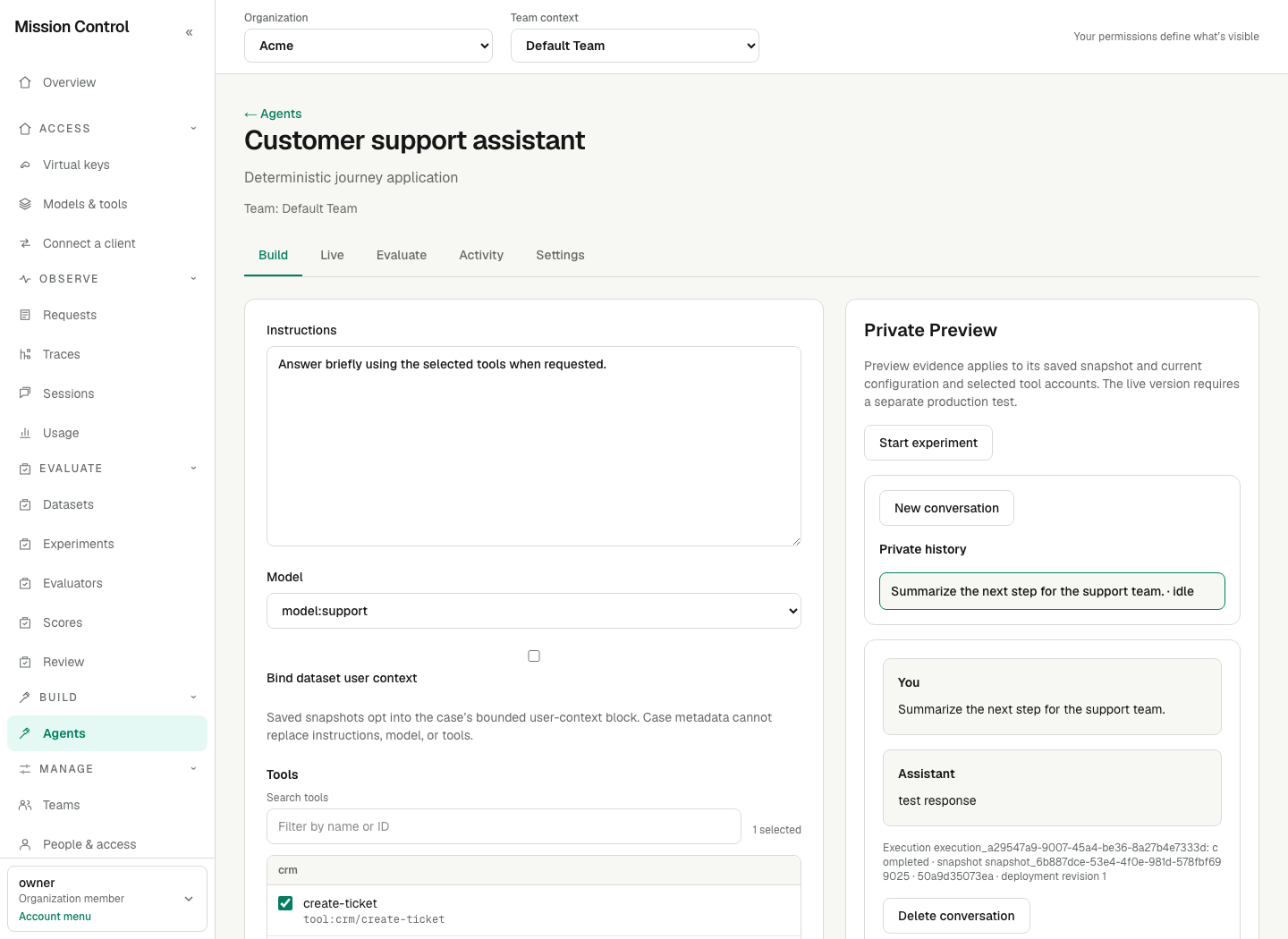
The account controls appear below the selected tools in Build. The Preview conversation tests a saved snapshot, including its selected accounts; unpublished edits do not change the live Agent.
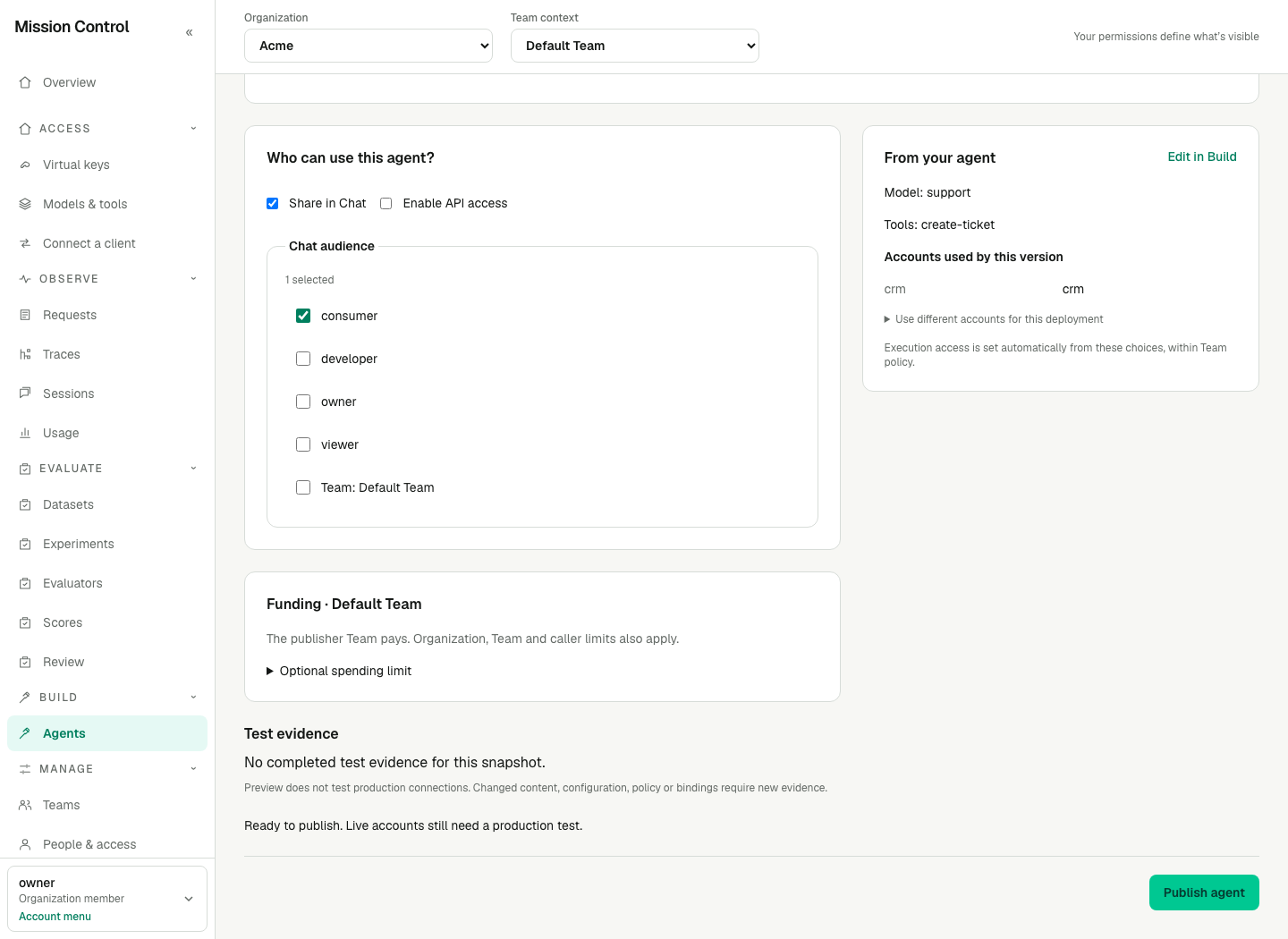
The review summarizes previously configured capabilities. Channel-specific audience choices appear only when their channel is enabled.
Expected result
Production uses immutable content and secretless managed execution access. Instructions and history remain application content in the Mission Control database; control evidence records hashes and identifiers. The managed runtime retains its finite 4,096 output-token bound per model round. Each model round and physical tool dispatch is independently admitted and metered.
The Live tab retains the existing /deployments address. Publishing to a paused destination retains its paused state. No application restart or new Console session is required for these changes.
Verification
Confirm the selected account appears in the review and is used by Preview. Change a draft and confirm Live remains on its published version. Check an allowed and denied Chat/API caller, including an invoke-only key that cannot call models directly. Test the live version separately; a Preview pass does not certify Production.
Failure recovery
For a save conflict, retain local edits and compare the latest saved draft. For a stale publication review, check refreshed live settings before retrying; a changed proposal requires a fresh preflight. For a missing or ambiguous account, return to Tool accounts. Personal-account failures require that person's reconnect. A custom policy conflict requires an access manager to amend the policy or explicitly choose automatic access during publication.
For an uncertain publication response, inspect Live before retrying. The reviewed publication fingerprint reconciles a repeated successful submission. For uncertain execution, reconcile the recorded outcome before sending duplicate work. Version history → Restore version retains current accounts, grants and caps, checks account compatibility and custom restrictions, and derives the restored definition's access in automatic mode. A policy change requires access-management authority; required evaluation checks still apply.