Manage a Live Agent
Purpose
Manage a published Agent's audience, accounts, limits and lifecycle independently of its unpublished draft.
Prerequisites
Select the owning Team. deployment.read reads deployment metadata; deployment.access.manage permits sharing, account, policy and bounded cap changes. deployment.publish publishes or restores content. deployment.manage pauses/resumes. Live testing requires the actual deployment execution permission. API key creation has its own existing user/service-key permissions and is not granted by publication. General budget authority remains separate.
Procedure
- Open Live in the Agent workspace. One destination opens directly; choose a destination when several exist. The current version and status identify what is running. Use Review & publish to review a saved content update, or Deployment management → Add deployment to create another destination.
- Choose Change access. Share in Chat reveals Chat audience. Enable API access reveals API callers, asking which people or service accounts can call the Agent. The bounded lists retain removable grants omitted from active choices. Exact user membership instances remain distinct. Save access writes only changed fields and does not publish draft content.
- Review API setup in Live. An owner grant reads Access granted. Eligible key found means a current manageable key passed the Team/deployment policy check at that time; Key setup needed means no eligible key was found among that owner's fully visible keys. Team access needed means the Team allowance excludes this deployment: an authorized administrator can use Manage Team access to allow it, then complete key setup. Key status unavailable means you cannot inspect the relevant keys. It does not mean no key exists. Authorized key creators can choose Set up API key to use the existing invoke-only wizard. A service-account link preselects that service; Back to live agent returns to the same destination after setup. The API endpoint is displayed for this destination.
- Choose Change accounts to rotate a company account for the live definition, then Save accounts. This does not update draft defaults or content. A future content update retains the live account when the draft default is unchanged. Personal requirements continue to use each initiating person's account. Change a requirement's identity mode in Build and publish it as a content update.
- Choose Change limits. In Execution caps, choose a Metric; valid Window and Unit choices follow it. Limit (USD) accepts dollars with up to six decimal places; other units require whole numbers. The management API stores USD micros. Blank clears the selected local cap, and
0blocks spending. Save cap changes that dimension only. Existing caps display amounts and usage in words, for example “Operating spend cap · monthly (UTC) · $25.00 · revision 2; used $1.23”. - Use Advanced execution policy → Edit administrator policy only for an explicit restriction. Save execution access selects custom policy mode. Future publications must fit that policy. An access manager can select Use agent choices automatically for execution access during publication to review and restore automatic derivation. This never overrides Team allowance or current resource policy. Managed execution keys/services/namespaces remain unavailable through ordinary key APIs.
- Under Deployment controls, choose Pause or Resume. Disabling a channel also stops new entry through it; retained grants are inactive while that channel is off. Pausing does not claim cancellation of already dispatched upstream work.
- Use Version history → Restore version, review the confirmation, and choose Confirm restore. Restore keeps current accounts, grants, caps and lifecycle status. It checks the restored content against accounts, current restrictions, funding and required evaluation evidence. Automatic mode derives the restored model/tool access; changing policy requires access-management permission. A custom restriction remains intact.
- Choose Test live version after publication or a live configuration change. This production smoke test makes real business calls. Private Preview and automatic preflight are separate evidence; preflight executes without business calls.
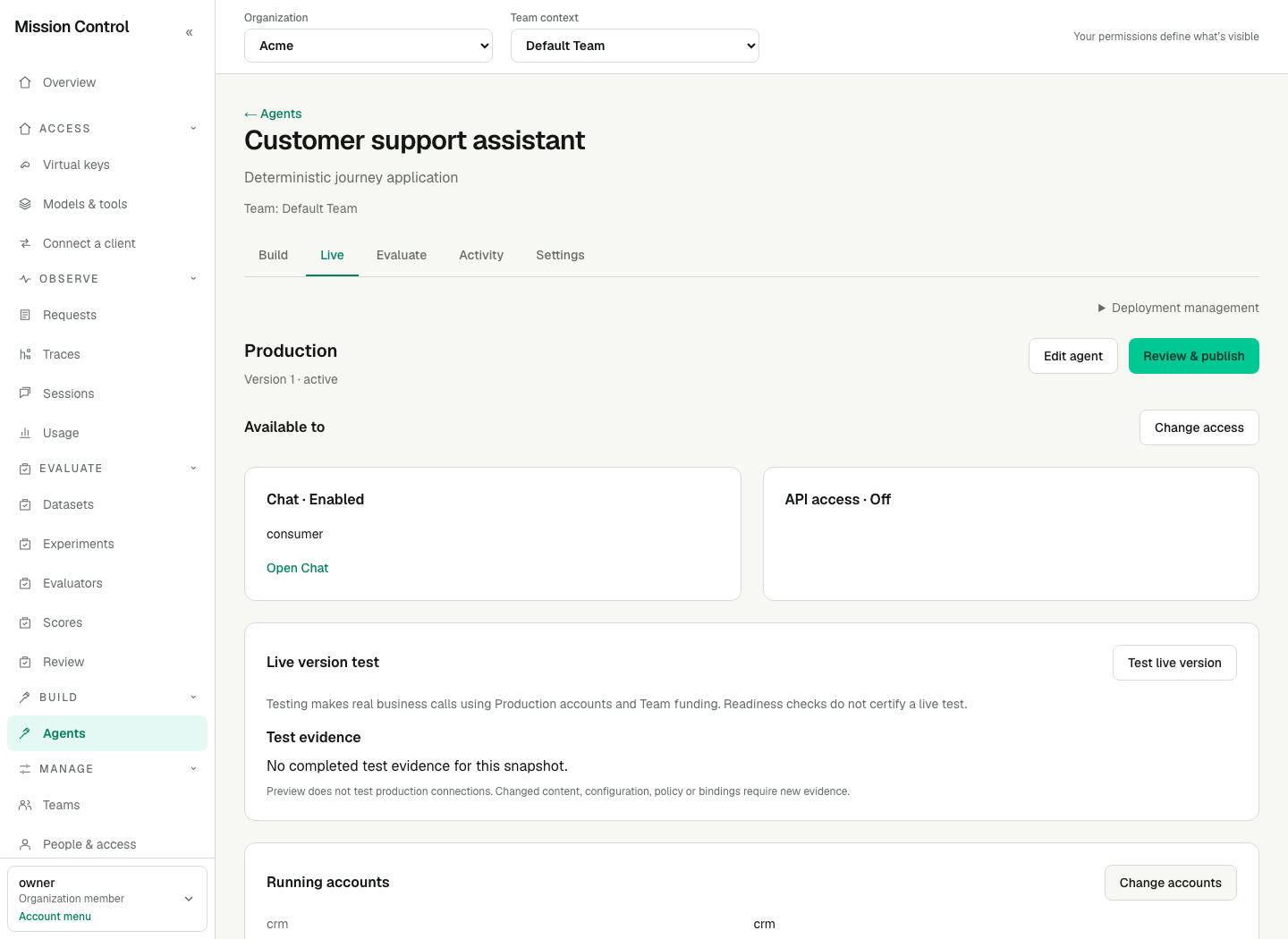
The running destination has focused access, account and limit controls. An unpublished draft is never submitted by those actions.
Expected result
The publisher Team pays for the managed execution. Chat audiences and exact API owner grants authorize entry, while child work uses secretless execution access. Each physical child is counted once. Access, accounts and caps can change while an unpublished draft stays private; content publication does not silently replace those live choices.
These management changes require no restart or new Console session. An application key must independently permit deployment.invoke and the destination, and current runtime checks still apply to every invocation. A Team Viewer does not automatically gain Chat access; a Chat consumer does not gain Team metadata or Builder access.
Verification
Save a private draft, change live access, and confirm the published version stays unchanged. Exercise an allowed and denied caller. Confirm a revoked audience cannot begin new work while its exact-owned private history remains governed by current Organization membership. Test accounts and funding through an explicitly authorized live test.
Failure recovery
For a revision conflict, refresh and review the latest live settings before applying your change. Remove stale owner grants explicitly; they remain removable when absent from current choices. If a restore requires different accounts or exceeds a custom policy, correct the specific requirement before retrying. Unknown running work retains evidence/reservations until confirmed or recovered. A failed readiness check never reserves future funds or proves live-account connectivity.