Operate LLM judges
Purpose
Use a versioned LLM judge to grade completed answers, inspect its model calls, and control its spending. For guided authoring of all grader kinds, use Create, test and calibrate graders.
Prerequisites
evaluation.manage creates and versions evaluators. evaluation.execute attaches them to experiments. Sample testing additionally needs current evaluation.read and evaluation.content.read; source-consuming graders require both observability read permissions. The Team must allow a suitable generation model. Model tests and judgments consume Team funding. Judge spend visibility uses budgets.read for caps and usage.read for amounts; cap management follows Judge spend.
Procedure
- Open Evaluate → Evaluators → New evaluator. Under Measure, name the grader, choose its kind and select or create its score definition. Choose Next: criteria; see Create, test and calibrate graders.
- Set criteria, inputs and measurement policy. For an LLM judge choose an allowed Model and write System prompt and User prompt using
{{input}},{{output}},{{expected_output}},{{tool_calls}},{{evidence}}or{{metadata.<key>}}. Choose Next: review, inspect the complete configuration and Create evaluator. The first immutable version and optional new definition save together. Choose Open evaluator to inspect it. Saving spends nothing; validated LLM/tool saves provision the Team evaluation identity. - Choose Test on samples, an Experiment and Samples (up to five), then Start test and Open test results. The form names the current saved version and refuses a stale selection. Tests use the requester’s current permissions, retain results/costs, and add no experiment scores or gate evidence. Model/tool tests can spend. Edit criteria and Save version for subsequent versions; successful samples offer Review/calibrate but do not calibrate the grader.
- Tick an evaluator under Evaluators on the Start experiment form to attach it. A ticked evaluator shows the version it pins, the current one unless you choose an older one from its version list, and View as JSON shows the grading plan the form submits. An evaluator the list no longer offers — archived or paused while the form stood — stays ticked and is marked Unavailable, so you can see what would be submitted and untick it. Every item that completes is judged once per attached evaluator, at that pinned version; the experiment page's Judges links name the attached versions and the live Grading counts show progress across them. Reopen an item or refresh the page to read newly recorded verdicts.
- On an item page each judge score shows its reasoning and a Judge execution link to the call that wrote it, with that call's Trace and Request. On the compare view choose Judge under Source to read judges' verdicts rather than people's.
- Choose Pause to stop new executions while the queued ones wait, and Archive to take an evaluator off the list. Set the Team's Judge spend cap on the Evaluators page: pick a Window, enter the amount in Limit (USD) as dollars —
5is five dollars — and choose Save cap. Blank removes the cap; zero blocks every judge call.
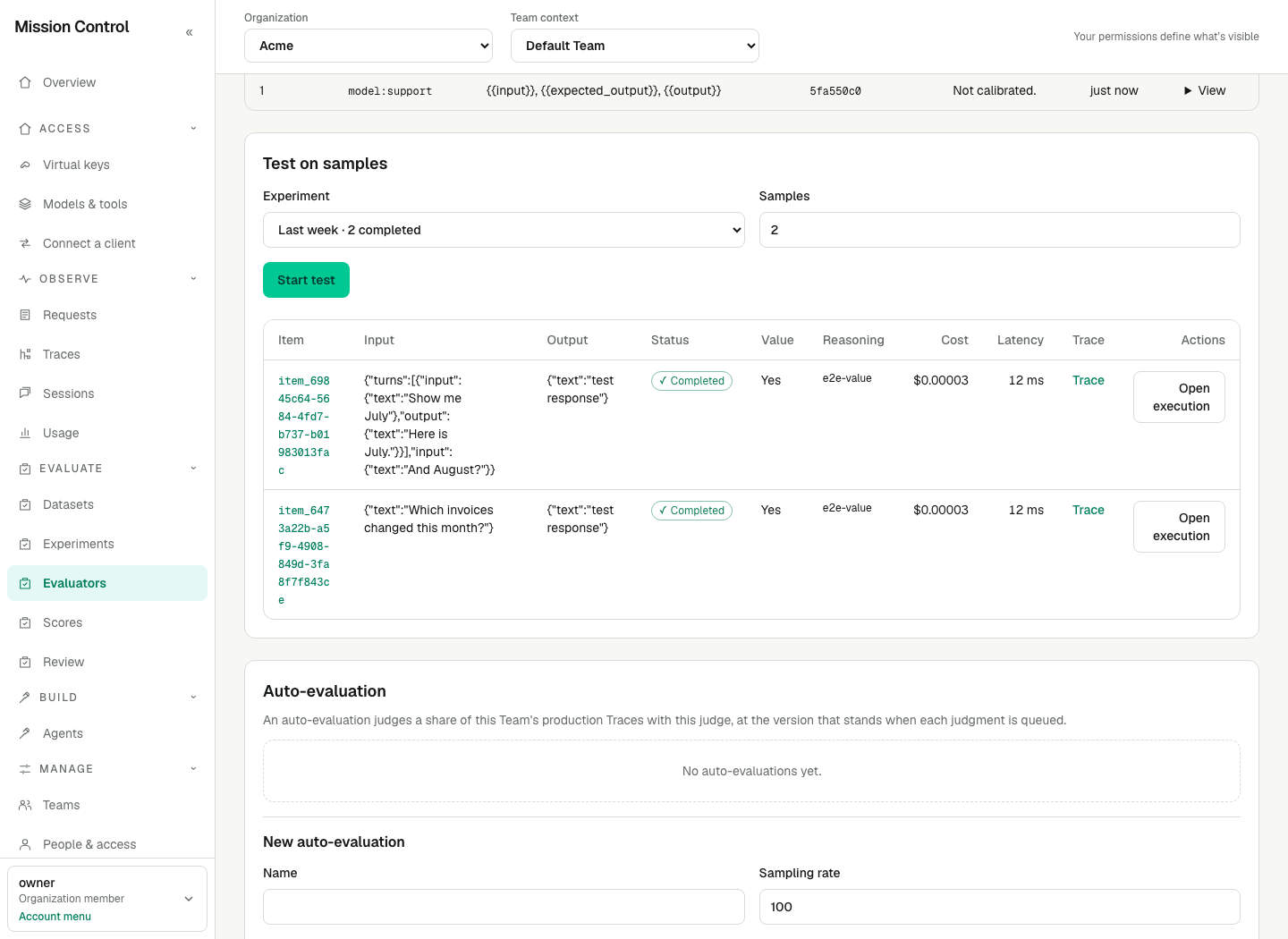
A judge's reasoning is content; the value it produced is metadata, like every other score.
Expected result
An evaluator version is immutable: its prompt, its model and its score definition together are what a judgment can be reproduced from, so editing the prompt makes the next version and leaves every recorded judgment attached to the one that produced it. Each judge call is a governed model Request funded by the Team through its evaluation identity — a managed service account and a key that has no secret and can never be presented over HTTP — so every judgment has its own Trace, its own Request and its own cost, exactly as an experiment item does. The judge is asked for a structured answer whose value follows the definition: a number in the range, one of the categories, or yes or no. The value is metadata and the reasoning is content, so evaluation.content.read reads the prompt and the reasoning and everyone else sees Hidden. Judge and human scores on one definition are never merged: the experiment's Scores summary, the item rows and the compare view all name the Source of each.
Verification
Open the evaluator and confirm its Score definition and pinned version. After one completed experiment item, inspect its score, Judge execution, Request, Trace and cost. A sample test alone does not add experiment scores or gate evidence. Saving a version or cap requires no restart or new session.
Failure recovery
Use the evaluator's Executions table and execution detail to distinguish a failed judgment from one waiting to retry.
| Code or state | Meaning and recovery |
|---|---|
model_unsupported |
The route cannot produce the required JSON-schema output. Choose a supported model and save a new version. |
invalid_output |
The answer does not satisfy the score definition. Inspect the prompt, definition and protected answer. |
invocation_failed |
Inspect the underlying governed model Request. |
authentication_failed |
Ask the operator to repair the upstream provider credential. |
item_input_invalid |
The item, its body or the prompt could not be read. Check retained content and authority. |
result_not_recorded |
The judgment finished but its score could not be written. Inspect the recorded execution before starting more work. |
attempts_exhausted |
Recovery attempts are exhausted; the execution will not retry automatically. |
Delayed with budget_exceeded |
Judge or ancestor funding is exhausted. Restore permitted funding or wait for the window to roll over. |
funding_unavailable, execution_key_unavailable, identity_unavailable |
The Team evaluation identity cannot currently fund/execute the work. Verify the saved evaluator and current identity state. |
unbounded_estimate, usage_unknown, usage_store_unavailable, invalid_funding |
The gateway cannot establish valid bounded funding. Repair pricing, output bounds or the usage store as indicated; do not treat unknown cost as zero. |
provider_rate_limited, provider_unavailable, provider_timeout, configuration_unavailable |
The judgment waits and is retried automatically through the governed recovery path. |
evaluator_archived |
The evaluator was archived before execution. The judgment becomes Cancelled. |
| Pending without progress | Ask the operator to check the gateway and EXPERIMENTS_ENABLED; enabling the worker requires a restart. |
Other governed model error codes are shown as returned; use Gateway errors.
Complete an experiment first means sample testing has no eligible completed answer. Resume the evaluator to test it. and An archived evaluator starts no tests. explain status restrictions. A Hidden judge prompt requires evaluation.content.read; you cannot edit a prompt you may not read. For requester/version conflicts and response loss, follow grader recovery.