Author explicit evaluation cases
Use versioned case identity, labels, tags and execution settings to preserve a source suite without turning arbitrary metadata into instructions. Start with Create and curate a dataset for basic case authoring, exports and version history.
Prerequisites
Use the selected Team with evaluation.manage to author cases and evaluation.content.read to inspect them. Starting an experiment also needs evaluation.execute and the existing subject permission: agent.test for a snapshot or deployment.execute for a published version. No new role or key is required.
For user context, a person with agent.edit must save a snapshot with Bind dataset user context enabled. Existing snapshots remain unchanged and treat the absent binding as disabled. A new snapshot is required to change that binding; it is part of the immutable definition hash.
Procedure
- Open Evaluate → Datasets, choose a dataset, and choose Add item or Edit.
- Enter the original structured Input and optional Expected output and Metadata. Metadata remains ordinary data: keys such as
effort,model,systemPromptandcontextdo not control execution. - Set Source namespace and External ID together. Both must be nonempty and at most 200 characters. A source identity belongs to one logical item in this dataset. It is read-only in subsequent edits and cannot be changed after establishment, and archived or permanently deleted items continue reserving it. Use a new dataset or a new source identity for a genuinely different case.
- Optionally enter a Case title (at most 300 characters), Tags, User context (at most 16 KiB in UTF-8 bytes), and Reasoning effort (Route default, Low, Medium or High). Tags is a chip box: type a tag and press Enter, or type a comma, to add it; each chip has a remove button and Backspace in the empty box removes the last. It allows up to 20 tags of at most 64 characters and refuses a further one, an over-long one or a repeat with a message beside the box, and it states how many of the 20 are used. Editing a case shows its tags as chips; removing every chip clears them. Input/expected-output limits remain 256 KiB each, metadata 16 KiB, and combined item content 512 KiB including these new fields.
- Choose Save item. Each edit creates a dataset version. Previously absent optional controls stay absent when left untouched. Editing a title or tag field to empty explicitly clears that formal presentation field; older items without those fields retain legacy metadata label/tag fallbacks. Clearing user context removes it from the next revision's settings.
- Select the intended snapshot and dataset in Start experiment and choose Check readiness. A context-bearing case requires an enabled snapshot binding. Reasoning requires explicit capability support on every configured route of the selected virtual model. Resolve a blocked setting before starting.
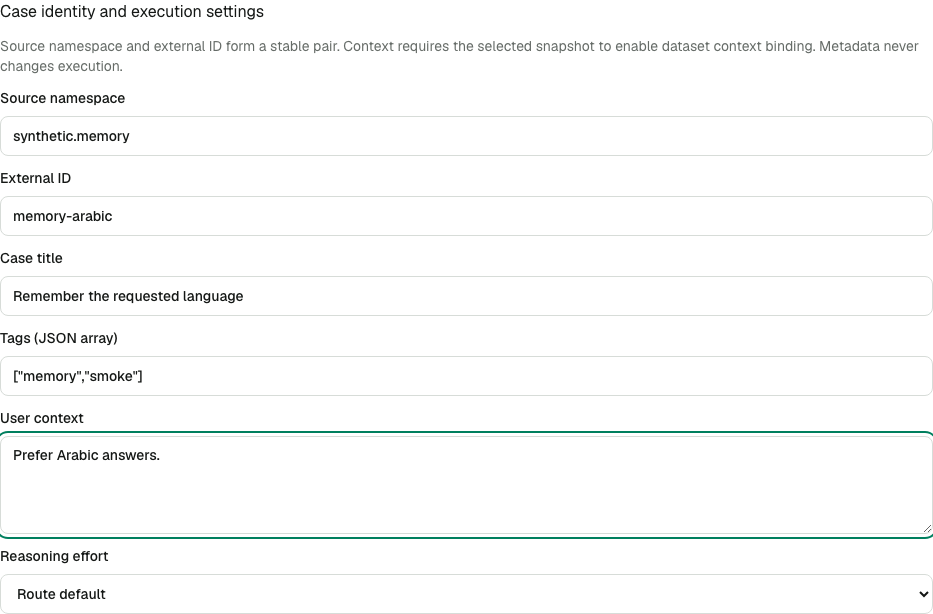
The identity and context fields share the same content authority as input and expected output. A metadata-only reader sees an opaque item identifier and no case labels, tags, namespace, external ID or settings.
Expected result and verification
Reimporting a mission-control.dataset/v1 document matches sourceNamespace plus externalId, even when an export's internal item ID is absent or comes from another dataset. Equal external IDs in different namespaces are separate cases. Known internal IDs remain supported for legacy items. Conflicting identity/ID pairs, repeated identities, unsupported fields and invalid bounds are rejected per item with a field-specific reason; accepted items publish together as one version. Established identities must be retained in subsequent imports. Import provenance remains Import, not a claim of the file's original Trace authority.
JSON exports retain the explicit fields when authorized, and CSV adds source_namespace, external_id, title, tags and case_settings columns. Old v1 documents and their absent-field content hashes remain valid. Source-specific fields belong in metadata until an adapter declares their meaning. In particular, a source CLI's “low/high” effort may choose different models as well as reasoning: it is not automatically equivalent to reasoningEffort.
The managed runtime appends a bounded, JSON-encoded user-context section to the saved instructions only when context is present and the snapshot opts in. Without context, the original instruction bytes are unchanged. No case can replace model, tools, credentials, tenant, or system instructions. Public AG-UI tools, state, context and forwardedProps retain their existing restrictions.
Each case and repetition has an isolated conversation. Its own multi-turn input retains its ordered conversation. An explicit retry starts a fresh conversation using the original dataset revision and settings; regrade uses saved outputs and performs no generation or context reapplication. Manifests include safe binding and selected-content/settings identities, without context text. Historical manifests are never rewritten. Compare case inspection displays the protected settings from the original revision.
Reasoning support and recovery
Reasoning is supported only for explicitly declared efforts on the OpenAI profile with Chat Completions upstream. An administrator configures capabilities.reasoningEfforts; absent declaration means unsupported. A profile's ability to encode a field does not establish that the actual provider model supports it. All routes must support the effort, so a setting cannot silently switch the selected model. Responses upstream and other profiles are refused for this capability: the current stateless Responses subset does not retain reasoning continuation items.
case_context_binding_disabled means select a snapshot saved with the binding enabled, or remove context in a new dataset revision. case_reasoning_effort_unsupported means use Route default, choose an actually supported route configuration, or remove the setting. Runtime admission repeats these checks against the exact admitted item. Changed route configuration also invalidates recorded readiness/retry configuration. Administrators must activate configuration and restart gateway processes after capability changes; no new user session or virtual key is needed.
For an identity conflict, keep the established namespace/ID pair or import the new case under a distinct pair. A permanently deleted item's content cannot be recovered by reimporting its reserved identity. For an oversized context, shorten its UTF-8 body; do not hide it in metadata expecting execution.
Run versioned slices of one dataset
Use Versioned slices to run full, smoke, suite or memory selections without copying cases into separate datasets. Slice names and filters are protected content. Authoring requires evaluation.manage; reading names/filters and evaluating previews requires evaluation.read and evaluation.content.read. Launch also requires evaluation.execute and the subject permission above. No restart, new key or session is needed.
- Open the dataset's Versioned slices section. Enter a Slice name and set the Filter: tick tags under All of these tags and Any of these tags, search Specific cases by title, external ID or item ID and add each case to the list, and add Metadata equals conditions by choosing a key, a value type (Text, Number, True or false or Empty (null)) and a value. A new condition starts with the value type the dataset holds for that key. Then choose Create slice. For example, ticking
smokeunder All of these tags and adding the conditionsuiteas Textlookupselects cases with both the tag and exact suite value; View as JSON shows the submitted filter{"allTags":["smoke"],"metadataEquals":{"suite":"lookup"}}. A filter with no condition submits{}and says that it selects all active cases. - Choose a saved Slice version and an explicit Dataset version, then Preview slice. Check the selected and excluded counts. These counts cover all active cases at that dataset version; archived cases are outside that version's active scope.
- Choose Start with this slice. The destination retains the exact dataset version, slice version and counts even if someone subsequently adds cases or saves a new filter version. Choose the subject, grading and repetitions, then Check readiness and Start experiment. A paid smoke may still select just one original member.
- To change a filter or name, edit the controls and choose Save slice version. Each save creates an immutable version; existing previews and runs retain their previous version. Select a saved version to discard unsaved edits: its filter is loaded back into the controls, and a tag or case that no longer exists stays chosen and is marked Unavailable; a metadata key that no longer exists stays chosen with "(unavailable)" beside its name. Reload after a revision conflict before saving again.
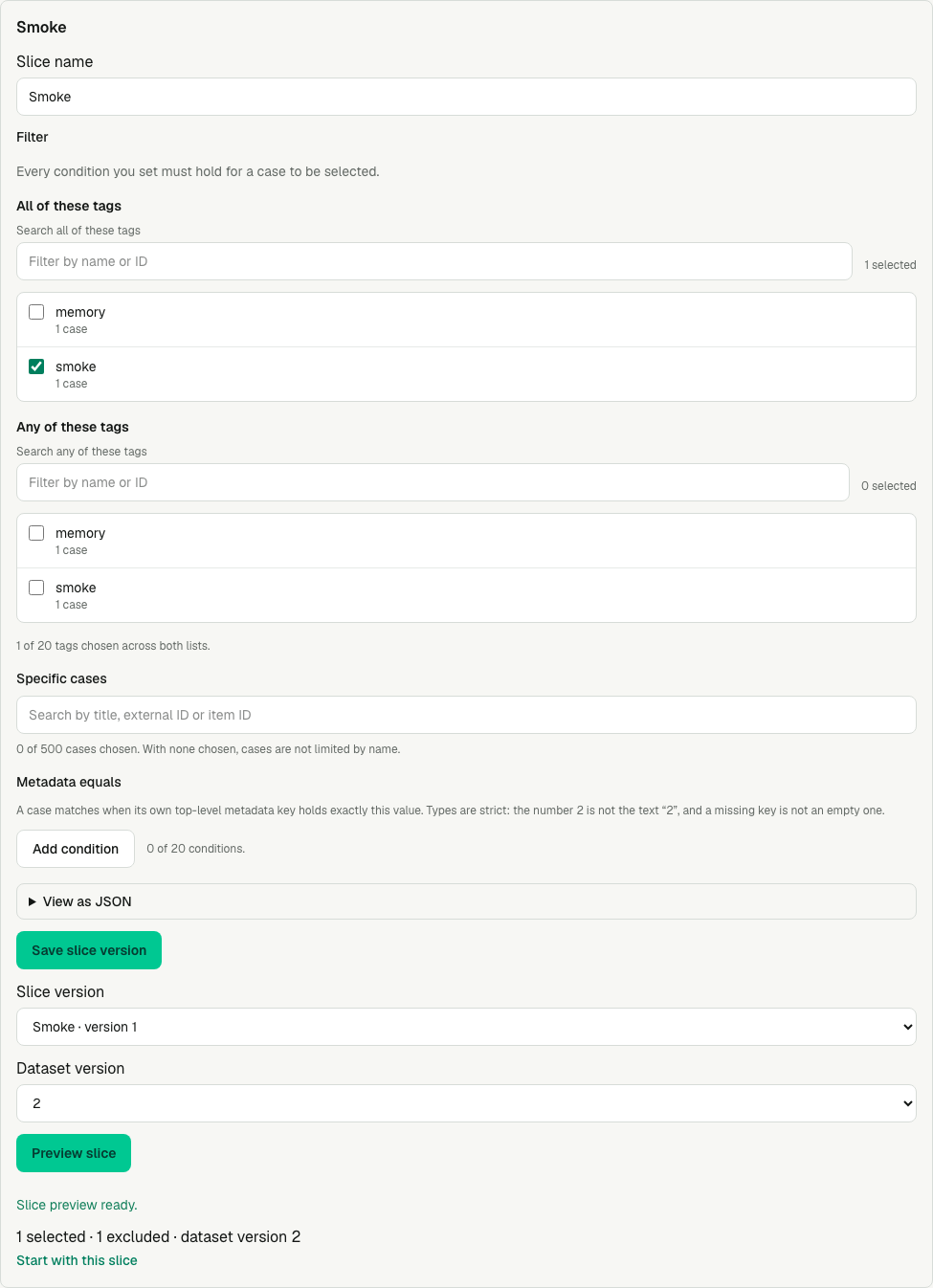
The preview identifies both version numbers and the complete membership counts. Starting from it does not silently substitute the current dataset version.
All filter dimensions intersect. The controls write the filter document: All of these tags is allTags, Any of these tags is anyTags, Specific cases is itemIds and Metadata equals is metadataEquals. allTags requires every listed tag; anyTags requires at least one; itemIds names logical internal item IDs; metadataEquals compares own top-level scalar metadata keys with strict type equality. Missing differs from null, and 1, "1" and true differ. Formal case tags take precedence: explicit tags: [] clears legacy tags; only absent formal tags fall back to a legacy string array in metadata.tags. An empty filter {} selects all active cases; an explicit empty itemIds or anyTags selects none. Unticking the last tag or removing the last case leaves that dimension unset, never an empty list. Only a version saved through the API can hold one: loaded into the controls it shows a warning, and saving again writes the empty list again until you remove it or choose at least one tag or case. Duplicate IDs never create duplicate work.
Bounds are 20 tags combined across allTags and anyTags (each 1–64 characters), 20 scalar equality predicates, and 500 explicit IDs (each 1–200 characters). The form counts tags, cases and conditions against these bounds and stops at each one: at the tag bound it says to untick one to choose another, at the case bound to remove one, and at 20 conditions Add condition is disabled. It offers only what the bounds allow: an empty tag or key, a legacy metadata.tags string longer than 64 characters, and a metadata key longer than 200 characters are never listed, because no saved filter could hold them; one that a saved version already holds stays chosen and is marked unavailable. Predicate keys are 1–200 characters; string values are at most 4,096 characters. Arrays, nested object comparisons and executable expressions are refused. Repeated entries count toward input bounds before deduplication. Resolution supports complete versions with at most 5,000 active cases. Above that bound, slice_dataset_scope_limit refuses the whole preview/launch; it never treats the first 5,000 rows as the full version. The existing 1,000-invocation experiment limit still applies after selection and repetitions.
Result, verification and recovery
The immutable run manifest/export records slice with sliceId, sliceVersionId, version, filterHash, selected/excluded case counts, and canonical selected item-revision/repetition triples with selectionHash. Readiness identity changes when slice version or membership changes. Binding and settings hashes come from the exact selected historical revisions. Filter values, tags, title and source IDs never enter that safe manifest identity. Old manifests and hashes remain unchanged. The slice counts describe the resolved filter; a paid one-case smoke or later selective retry can have fewer execution pairs, which the manifest's selection records exactly.
An empty slice can be previewed but cannot launch. slice_dataset_content_unavailable or slice_content_unavailable means protected historical content was erased or is unavailable: choose an available version or recover retained content through the supported backup procedure. Missing content is never treated as empty metadata or silently excluded. Permanent deletion can make fresh historical previews unavailable. Queued and historical membership is never re-evaluated; deleting an excluded case does not alter queued membership. If a selected body's content becomes unavailable, execution is refused while the original membership stays recorded.
Use a new request key for a changed API write; repeat the same key and body after response loss to retrieve the same safe receipt. request_key_conflict refuses changed intent under the same key. A stale expectedRevision returns slice_revision_conflict. stale_preflight means check readiness again against the intended versions. Content access is checked again before predicate evaluation and queued admission.
A smoke, suite, memory or retry subset cannot satisfy a full-dataset publication gate merely because every selected case completed. Such gates require all active historical dataset revisions and repetitions, checked before candidate limiting. A full slice qualifies only when its actual membership is complete. Retries retain original selected revisions/repetitions/settings and start fresh conversations; regrades remain generation-free.
The deterministic synthetic fixture demonstrates one canonical dataset with full, smoke, suite and memory slices. Earlier source datasets are preserved; this feature does not import, duplicate, delete or rewrite them.
Related links
- Evaluate overview
- Check readiness
- Retry and regrade
- Compare evaluation evidence
- Model configuration
- Management API
Import a complete evaluation suite
Purpose and prerequisites
Use Import evaluation suite to reconcile definitions, complete graders, datasets, slices and comparison templates together. A source namespace and stable object keys identify previously imported objects; repeating the same bundle in a fresh upload reuses their resources and versions. Historical dataset revisions, grader versions and experiment evidence remain available.
The upload author needs current evaluation.read, evaluation.manage and evaluation.content.read in the selected Team. Upload status belongs to that author; another member cannot resume the private staging session. Bundled templates also need the selected snapshots' read/test rights, and proposed model variants require agent.edit. Models and validator tools must already be registered and inside the Team allowance. This creates no new role preset or standing credential.
A bundle is mission-control.evaluation-bundle/v1, at most 16 MiB, with at most 200 objects and 5,000 provided cases. Each case needs a stable id or a sourceNamespace/externalId pair. Existing dataset reconciliation refuses more than 10,000 open case identities (including retained archive/delete reservations) and more than 5,000 active cases, instead of truncating a scope. Ordinary single-dataset and single-evaluator imports remain supported.
Procedure
- Open Evaluate → Datasets → Import evaluation suite. Select a Bundle file and choose Upload bundle. Uploads use bounded chunks and expire after 24 hours. The URL and Resume link identify the upload; after reloading, select the same file and Resume upload. No resource is published during staging.
- Under Map existing resources, map source model aliases to permitted models, validator references to tools the Team allowance permits, and snapshot aliases to saved snapshots in this Team. Tools are chosen by name from a searchable list grouped by connector, and Use the bundle's resource keeps the bundle's own reference. Snapshots are searched by Agent name, snapshot number or a pasted snapshot ID, and Use the bundle's reference empties a chosen snapshot mapping again. An empty mapping means the exact resource reference from the bundle. Mapping cannot change a tool's pinned schema hash or grant resources beyond the Team allowance. Use existing Team objects (optional) lists one row per bundle object, named by the object's own name and kind, and offers the Team's active objects of that kind by name; Create or reconcile from the bundle leaves a row unbound. It deliberately binds a source key to an existing resource of the same kind; names alone never adopt existing data.
- Choose Preview suite import. Inspect every object's create, Use existing, unchanged, update or Local edit conflict action, proposed versions, and added/updated/unchanged/retained case counts. Preview is read-only: it makes no provider/tool call and provisions no execution identity. Field-addressed issues identify missing references, invalid hashes, unsupported settings and denied resources.
- Resolve each change or local conflict by selecting Update … from this bundle, or cancel and correct the file/bindings. There is no silent overwrite or partial import. Immutable definition name/type/range, grader kind/definition and slice-dataset changes require a supported new object rather than an in-place rewrite. Source categories already used by live scores can only be added to.
- Choose Import complete suite. Protected bodies become durable before one control transaction publishes all resource changes, associations, audit records and the safe receipt. An error leaves the existing suite intact. Inspect Suite imported, resource IDs/versions, and the links to datasets, evaluators and templates. Saving does not itself run an experiment. Updating a grader with active auto-evaluations changes the version used by future sampled traffic; existing experiments retain their pinned versions.
- Before launching an imported template, use the comparison flow's Check readiness. The import checks provided case settings selected by the template's slice; unselected or retained cases still need the complete launch check. Source metadata is preserved as data and never changes model, tools, credentials, instructions or execution settings.
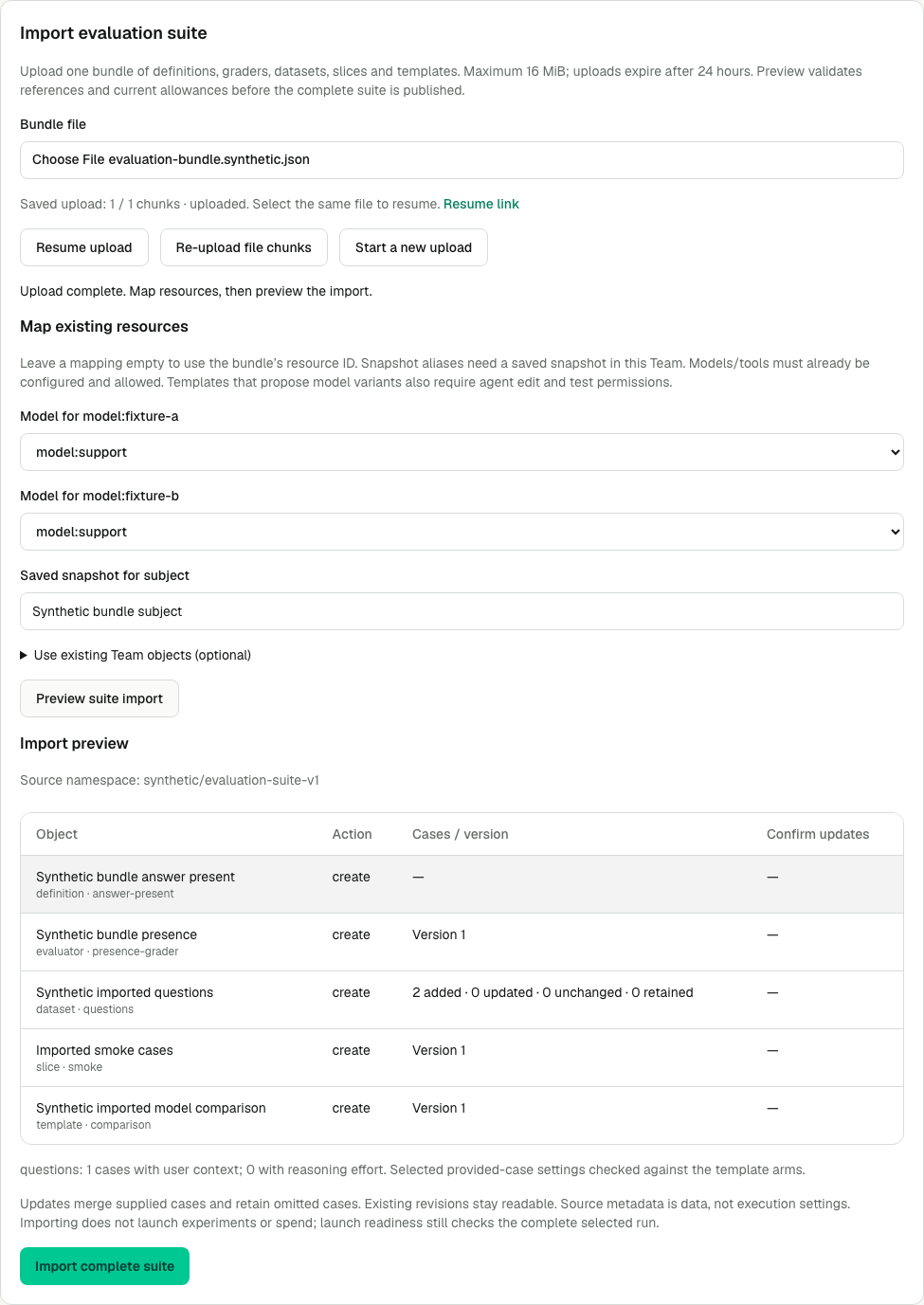
The synthetic fixture maps both model aliases to model:support, an explicit same-model A/A control for import verification. It shows five objects and two preserved cases before publication. It is not a production model comparison. The snapshot alias is mapped by searching for the saved snapshot and reads as its Agent's name.
Expected result and verification
There is one canonical imported dataset, with exact case inputs, expected outputs, tags, metadata and supported settings. Updates merge supplied cases; omitted existing cases are retained and counted, not silently deleted. New provided case IDs are preserved, existing namespace identities reconcile to their established local IDs, and unchanged cases do not gain unnecessary revisions. An explicitly supplied original source label cannot rewrite an existing case's immutable origin; record changing source revisions in metadata.
Import the same file again with a fresh upload session and the same bindings. All unchanged objects should remain unchanged, with the same resource IDs and versions. No experiment or automatic score is fabricated. Confirm unsupported fields are reported rather than omitted, and inspect the exact imported grader kind, Measurement policy, slice version and template pins.
Failure recovery
- Resume upload sends missing chunks of the same file. Re-upload file chunks can repair erased/corrupt private stage bytes while the session is live. Different bytes at a committed chunk index are refused. An expired upload requires Start a new upload; expiry does not delete published resources.
- A lost commit response offers Retry saved import request. The original bindings, preview hash, resolutions and request key stay fixed until its receipt is recovered. A changed body under the same successful key conflicts. After refresh, the resume URL can show the committed result even if staged file bytes have expired.
bundle_preview_stalemeans a target changed after preview. Refresh the preview and review its new revisions/conflicts. A duplicate name requires an explicit same-Team object binding or a corrected source name/key. A permanently deleted case identity is not resurrected.- Missing model/tool registration, tool-schema drift, unavailable snapshots, unsupported formal reasoning/context settings and source hash errors block the whole import. Update the relevant resource or source document; no failed preview widens execution policy.
- Logical stage expiry is immediate at 24 hours. The gateway performs bounded physical cleanup every minute, independently of generation-worker enablement, and new uploads also run cleanup. Cleanup checks published control references under the control write lock, so it cannot delete a body being published or an older committed version.
For the file format and copyable private API workflow, see Suite bundle API. A deterministic example is platform/packages/control-plane/testdata/evaluation-bundle.synthetic.json; regenerate it from the repository root with Node 24/pnpm11.22.0 using pnpm --dir platform exec node --import tsx ../scripts/generate_evaluation_bundle_fixture.ts.
Convert a source suite
Preserve each original case ID, question, turn, expectation, rubric, tag and source revision. Reconcile repeated imports with stable sourceNamespace and externalId values. Map source fields into explicit case fields only where their semantics are supported. A source low/high field that selects different model routes is not automatically reasoning effort in Mission Control. Preserve its original value and produce an applied/unsupported/refused settings report. Never drop a case or silently execute an unsupported setting.
Verify case membership and slice counts before launch. Keep comparison arms equal apart from the intended change, and enable explicit dataset context binding only for supported literal user context. An imported bundle establishes neither completed evaluation results nor equivalence to an external application's conversations, memory or source runner. External application execution is not included in the current release. See Create and compare model runs and Create, test and calibrate graders.